AI + Unity: Can a Backend Dev Make a Game? (Part 1)
I write Go backends for a living. Cloud infrastructure, distributed systems, Kubernetes - the usual corporate stack. In that world, AI tools like Claude Code are genuinely amazing. You know what you want, you can evaluate the output, and the AI accelerates you 5-10x.
But I had a question nagging me: what happens when you use AI in a domain you know nothing about?
If I can’t tell good from bad, does the AI still help? Or does it just generate confident-looking garbage that I accept because I don’t know better?
To find out, I picked the domain furthest from my comfort zone: game development. Specifically, building an RPG in Unity, inspired by Gothic 2 and Oblivion. The twist: all 3D assets would be AI-generated. Zero manual modeling. Just prompts in, game assets out.
This is part 1 of what will probably be a long series. Spoiler: it’s not a success story.
The Grand Plan
The idea was straightforward on paper:
- Text prompt → describe what I need (“a medieval oak tree, fantasy style”)
- FLUX.1-dev → generate concept art from the prompt (2D image)
- Trellis2 → convert that image into a 3D model
- Blender → clean up the mesh, fix normals, scale for Unity
- Copy to Unity → import the GLB file and use it in the game
All running locally on my RTX 5090 (32GB VRAM), Ubuntu, no cloud APIs for generation. Claude Code orchestrating the whole thing.
The hardware is overkill for what I’m doing, but I figured if anything can brute-force AI asset generation, it’s a 5090 with 32 gigs of VRAM. (Narrator: it could not.)
MCP + Unity: The Part That Actually Works
Before I get to the failures, let me talk about what genuinely impressed me.
I use coplay-mcp - an MCP server that connects Claude Code directly to the Unity editor. From my terminal, Claude can:
- Create, move, and modify game objects
- Check if the project compiles
- Save scenes
- Inspect the hierarchy
This is genuinely useful. Instead of switching between terminal and Unity, I can just tell Claude “add a directional light to the scene, set it to warm white, rotate it 45 degrees” and it happens. Setting up a basic scene with a ground plane, player cube, and some test objects was almost effortless.
The tooling story for AI + Unity is actually solid. It’s the asset generation where things fall apart.
The ComfyUI Detour
My first approach was to use ComfyUI as the orchestration layer for the AI models. ComfyUI is great for experimenting with image generation workflows - you wire up nodes visually, tweak parameters, iterate.
FLUX via ComfyUI worked fine. About 14 seconds per concept art image, decent quality. No complaints there.
Then I tried to add Trellis2 (Microsoft’s image-to-3D model) as a ComfyUI node. This is where the evening went sideways.
First, CUDA compatibility hell. My RTX 5090 uses the new Blackwell architecture (sm_120), and almost nothing has pre-built wheels for it. The CUDA toolkit from Ubuntu’s apt (12.0) conflicted with PyTorch’s expected version (12.8). spconv couldn’t do bf16 on Blackwell. Every dependency was a fight.
After two hours of patching CUDA libraries and symlinking shared objects, I finally got Trellis2 running through ComfyUI. It generated… a flat 2D card. Not a 3D model. A flat rectangle with a tree texture painted on it. 4000 polygons of pure disappointment.
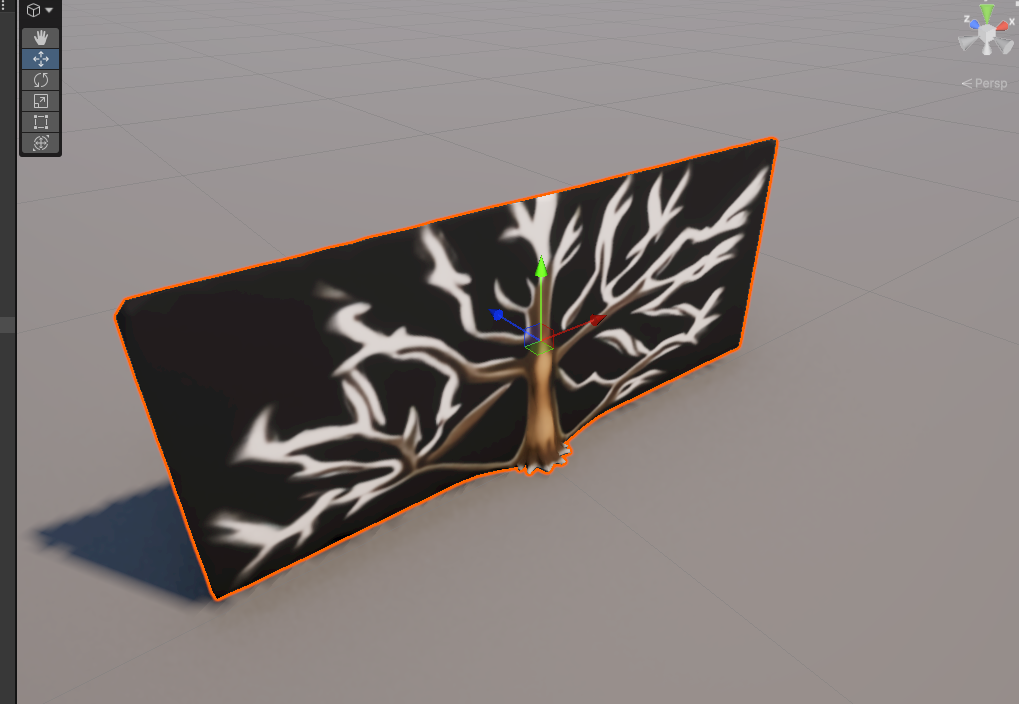 What Trellis2 produced through ComfyUI. That’s not a 3D tree. That’s a textured rectangle.
I tried different settings, different prompts, different resolutions. Same result every time: a flat relief instead of actual 3D geometry.
That was the moment I said screw it and abandoned ComfyUI entirely.
Now, to be fair - ComfyUI itself isn’t bad. If you’re an artist who likes visual node-based workflows, it’s genuinely great. The problem was that I was already juggling three separate projects: the Unity game, the asset pipeline code, and ComfyUI. ComfyUI’s strength is its interactive UI where you manually wire up nodes and experiment. But I wanted to manage everything programmatically from the asset pipeline repo - and while ComfyUI does offer a REST API (so you could theoretically store workflow JSONs and trigger them from code), every time I turned around there was another CUDA issue, another flash-attn incompatibility, another custom node that broke after an update. The friction of maintaining a third project just for orchestration wasn’t worth it when I could call the same models directly from Python.
The Standalone Pipeline
After the ComfyUI disaster, I switched to a clean Python pipeline. Direct library calls - diffusers for FLUX, Microsoft’s official Trellis2 API. No middleware, no node graphs, just Python.
Side note: I’m not even a Python dev. My main languages are Go and TypeScript. But the AI/ML ecosystem lives in Python, so here we are. At least Claude Code doesn’t judge my Python style.
This meant more setup pain: flash-attn took 30 minutes to compile from source (no pre-built wheels for Blackwell), three different HuggingFace models needed manual gating approval (FLUX, DinoV3, RMBG-2.0), and Claude Code had to patch RMBG-2.0 for compatibility with PyTorch 2.10 (I say “Claude Code had to” because let’s be honest - I wouldn’t have known where to start with debugging BiRefNet’s __init__ method).
But it worked. The standalone Trellis2 produced actual 3D geometry, not flat cards. The same model that failed through ComfyUI worked fine when called directly. Go figure.
The pipeline command ended up looking like this:
PYTHONPATH=vendor/TRELLIS.2 uv run scripts/pipeline.py \
  "a medieval oak tree, 3D render, volumetric" \
  --name Tree_Oak --tree-mode --num-clusters 50
About 30 seconds end-to-end: concept art generation, background removal, 3D conversion, mesh cleanup, and GLB export.
The Tree Problem
Here’s where the honest part begins.
Simple, boxy objects work OK. Crates, barrels, basic weapons - anything with hard edges and clear geometry comes through the pipeline looking reasonable. Not amazing, but usable for a prototype.
Trees are a disaster. Let me walk you through the full journey so you can appreciate the suffering.
It starts with concept art. FLUX generates a 2D image - this part works fine:
 FLUX concept art - good enough to feed into the next step. Not amazing, but it’s a tree.
Then Trellis2 converts it to 3D, Blender cleans it up, and you get… this:
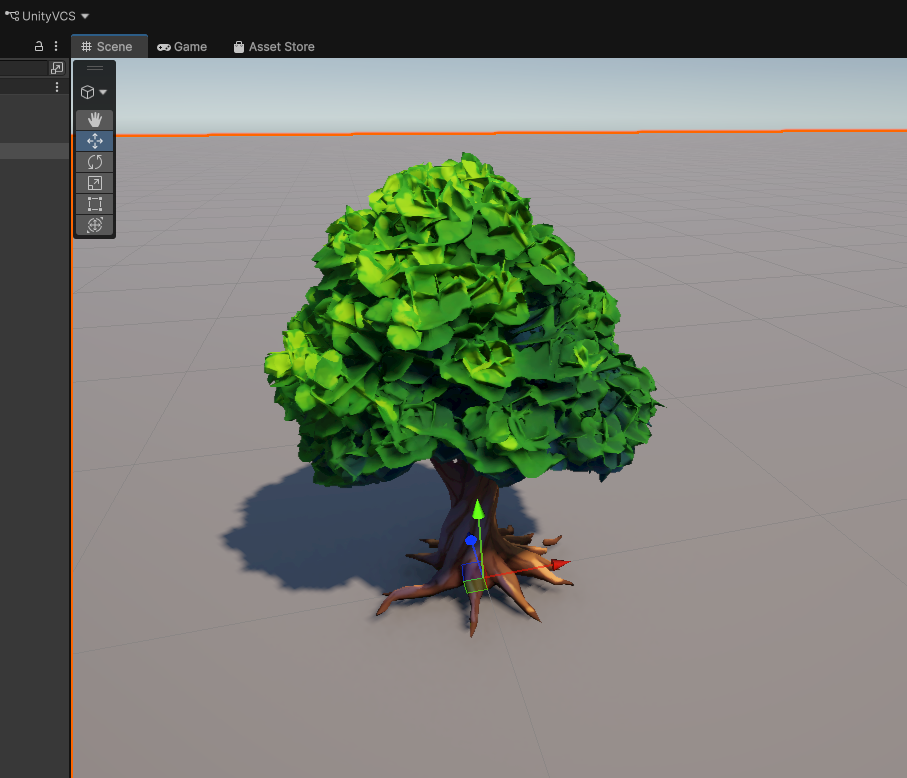 Tree #1 - hey, this actually looks like a tree! I was genuinely excited at this point.
OK not bad! It actually resembles a tree. I got optimistic. Then I ran the Blender cleanup script (merge vertices, fix normals, scale to Unity units):
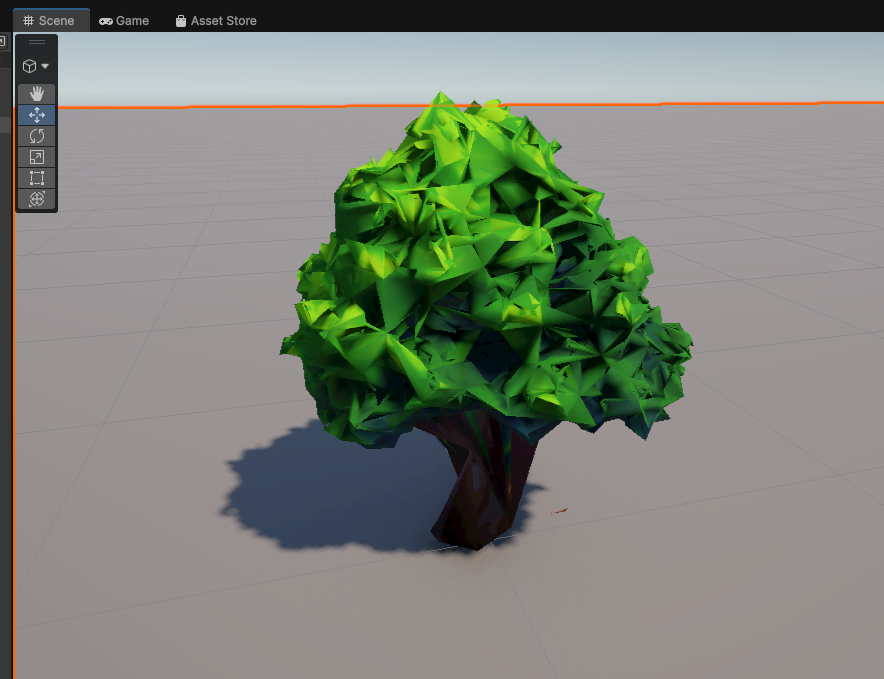 Tree #2 after Blender cleanup - the “optimization” made it look like a melted candle. Thanks, Blender.
That… went in the wrong direction. The cleanup process mangled the geometry. But fine, maybe I can work with the poly count. Let me try reducing polygons to hit a reasonable game budget:
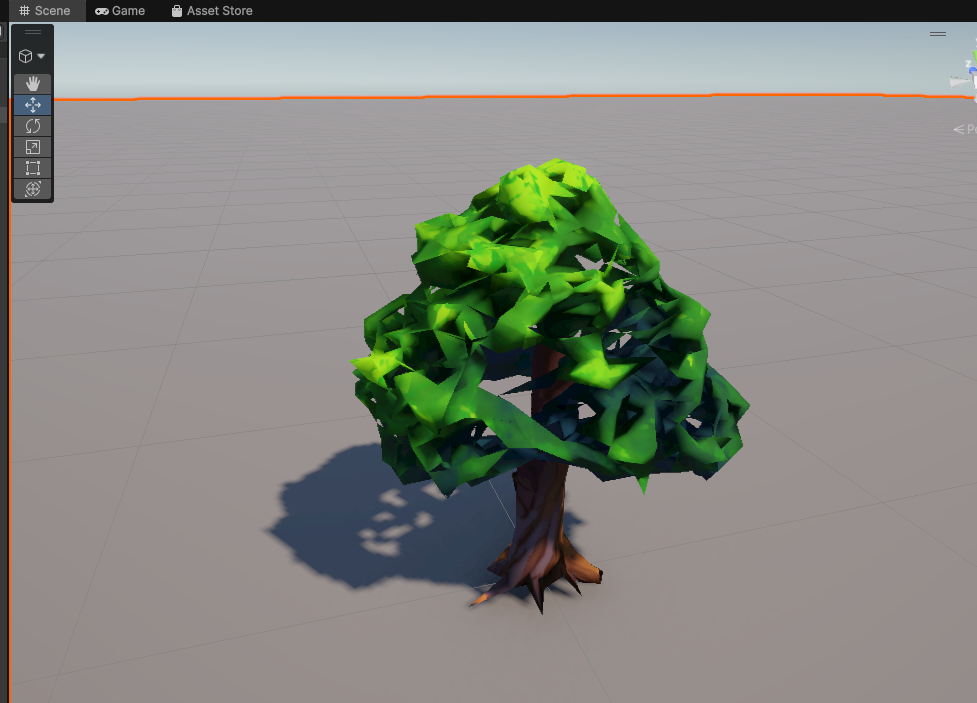 Tree #3 - tried to reduce polygon count. Now it has holes in the crown. Great.
Reducing polygons punched holes in the tree crown. But this failure was actually useful - it sent me down a research rabbit hole about how real games handle trees. Turns out, in professional gamedev, tree trunks and foliage are separate meshes. The trunk is geometry, the leaves are flat textured quads (“leaf cards”) with alpha clipping. I learned something! Small win.
So I tried generating just the trunk:
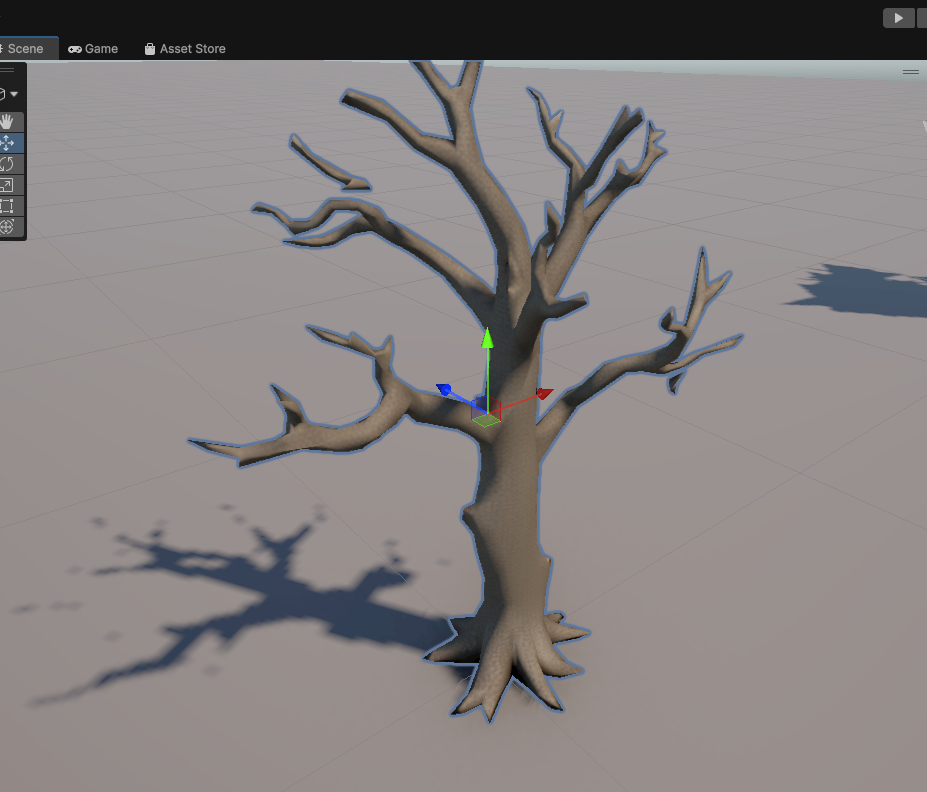 Tree #4 - bare trunk. See that branch floating in mid-air? I told myself the leaves would cover it. They did not.
Not terrible, except for that one branch growing out of thin air. I figured the leaf cards would cover it up. (Spoiler: they didn’t.)
Then I added AI-generated leaf cards:
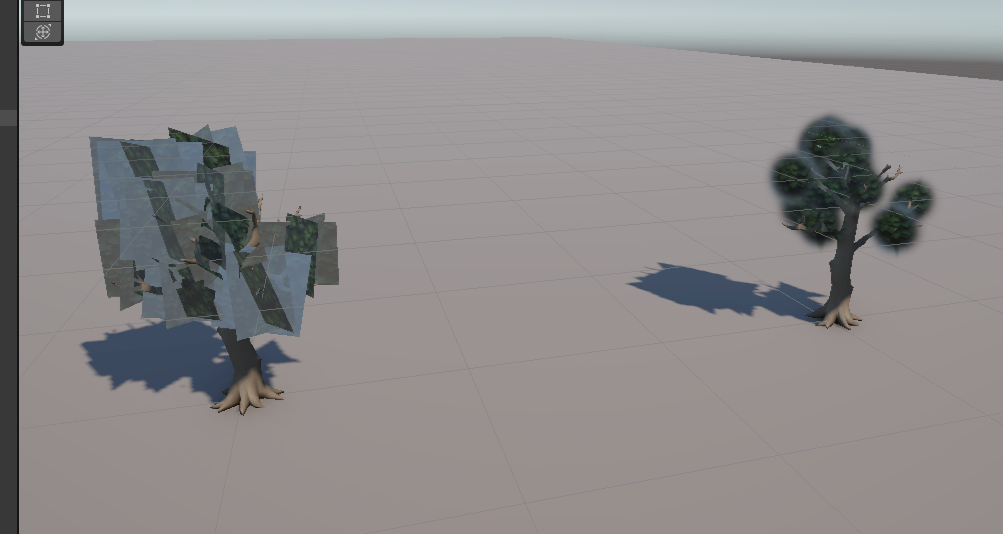 Tree #5 - the leaves are just… images. Floating around the trunk. Like someone threw photographs at a tree and they stuck.
The leaf textures came out as flat images awkwardly hovering around the trunk. Not exactly “immersive forest atmosphere.”
One more attempt with more realistic leaf placement:
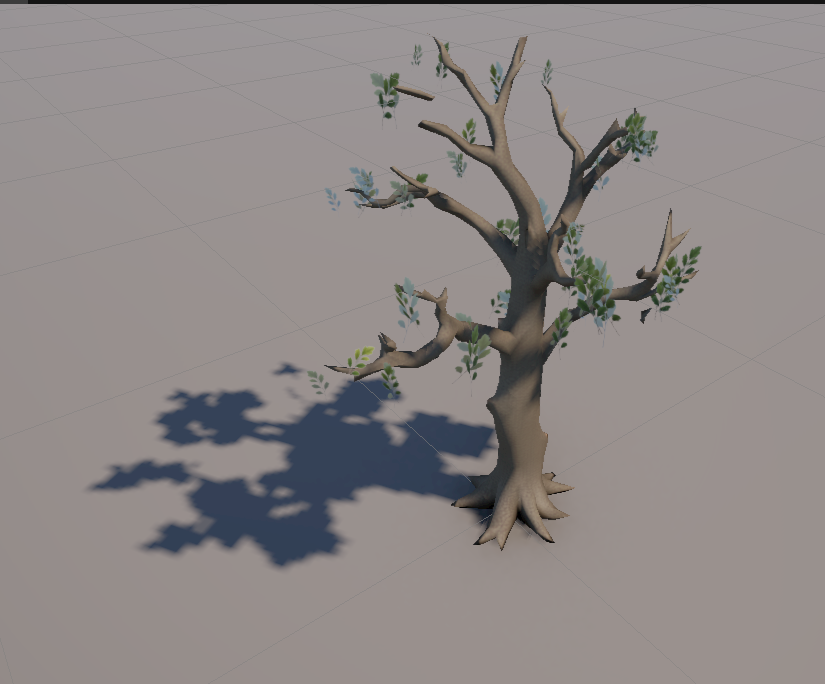 Tree #6 - leaves look slightly more like leaves now, but they’re growing out of places where leaves don’t grow. I gave up here.
Better leaf textures this time, but they’re sprouting from random spots on the trunk - places where no self-respecting leaf would ever grow. At this point I admitted defeat and moved on.
None of these would pass in any game made after 2005. The core problem is that organic shapes with fine detail (branches, leaves, bark texture) are beyond what current image-to-3D can reliably produce at game-ready poly budgets. The AI generates something that looks 3D from one angle, but rotate it and you see the artifacts, the weird topology, the missing depth.
The Honest Assessment
Here’s what I learned after a weekend of this:
AI in your comfort zone is a 10x multiplier. When I know what “good” looks like, I can prompt effectively, evaluate the output, and iterate fast. Writing Go backends with Claude Code is genuinely productive.
AI in an unfamiliar domain is… complicated. It helps with boilerplate -setting up the Unity project, writing the pipeline scripts, configuring build systems. Claude Code was great at the engineering parts. But it can’t replace domain knowledge. I didn’t know what good 3D topology looks like. I didn’t know what poly budget is reasonable for a tree. I didn’t know that leaf cards are a standard game industry technique until Claude suggested it.
The AI gave me correct information about these things when I asked. But I didn’t always know the right questions to ask. And when the output looked “close enough” to my untrained eye, I accepted it -only to realize later it was actually garbage.
The tooling is ahead of the models. MCP integration with Unity is great. Claude Code’s ability to orchestrate complex pipelines is great. The models themselves -specifically image-to-3D -aren’t there yet for production game assets. At least not for organic, complex shapes.
Don’t expect to “just prompt it and ship a game.” If you’re a backend dev thinking “AI will handle the art, I’ll handle the code” -it’s not that simple yet. Maybe in a year. But today, you still need either real 3D modeling skills or the ability to evaluate and iterate on AI output in ways that require understanding the domain.
What’s Next
I’m not giving up. The whole point was to document the journey, not to ship a game in a weekend. Next up:
- Make a tree that doesn’t look terrible - the bar is low
- Characters - will AI-generated humanoid models be better than trees? (They can’t be worse)
- Terrain - maybe procedural generation is a better fit than AI for landscapes
- Different 3D models - Trellis2 isn’t the only game in town, new models keep dropping
More posts coming as I fight my way through this. Stay tuned.
The asset pipeline runs on Ubuntu with an RTX 5090, using FLUX.1-dev for concept art and Microsoft’s Trellis2 for image-to-3D conversion. Claude Code with coplay-mcp for Unity integration. I’m not publishing the scripts yet - the codebase is a beautiful mess of half-working experiments and hardcoded paths. Once I clean it up (or give up on cleaning it up), I’ll put it on GitHub.